Clinical Trial Workflow and Data Integration
This page describes the end-to-end workflow for acne severity assessment in a clinical trial using the Legit.Health platform, from protocol design through to EDC data delivery.
Workflow overview
The clinical trial workflow consists of eight stages:
- Protocol design: Configure the study with Legit.Health
- Site setup: Deploy the platform to investigator sites
- Patient enrollment: Register patients in the platform
- Image capture: Guided smartphone photography at the site
- AI scoring: Automated endpoint calculation
- Report review: Investigator reviews the severity report
- Severity tracking: Longitudinal score monitoring
- Data export: Structured delivery to EDC systems
1. Protocol design
Before the study begins, Legit.Health works with the sponsor or CRO to configure the study protocol:
| Configuration item | Options | Example |
|---|---|---|
| Imaging perspectives | 2-perspective diagonal, 3-perspective perpendicular, custom | 2 perspectives (Hayashi Criterion) |
| Endpoints | Lesion count, density, IGA, ALADIN (any combination) | Lesion count + IGA (co-primary) + density (exploratory) |
| Global aggregation | Maximum, sum, or mean of local scores | Maximum (default) |
| DIQA threshold | Strict (pivotal) or lenient (RWE) | Strict for Phase III |
| Data export format | API, CSV, CRF-mapped fields | CRF-mapped to sponsor’s EDC |
A study-specific investigator manual is generated for each trial, providing site personnel with step-by-step instructions, example images, and a knowledge test to confirm training.
2. Site setup
The Legit.Health clinical trials platform is deployed as a web application accessible from any browser. Each investigator site receives:
- Login credentials for all study personnel
- Pre-configured protocol (perspectives, endpoints, scoring method)
- Investigator manual (digital, accessible from the platform)
- Training resources and knowledge test
No hardware installation is required; investigators use their existing smartphones for image capture.
3. Patient enrollment
After enrolling a patient in the study per the clinical protocol, the investigator creates the patient record in the Legit.Health platform:
Add new
Select the body area(s)
Select the most common
Do you want to track this condition?
Add condition
Each patient is identified by a study-specific pseudonymised identifier; no personal data (name, date of birth) is stored in the platform.
4. Image capture
The investigator captures photographs of the patient's face using the Legit.Health mobile application:
The application provides:
- Perspective guidance: Visual silhouettes showing the required capture angle for each perspective
- Real-time DIQA quality check: The image is evaluated for focus, lighting, framing, and resolution immediately after capture
- Immediate feedback: If the image fails quality standards, the investigator is prompted to recapture with specific guidance
- Confirmation: Once all perspectives pass quality checks, the images are submitted for AI processing
For the standard 2-perspective protocol, the entire capture process takes approximately 30–60 seconds.
5. AI scoring
Once images are submitted, the AI processes them automatically. Processing takes approximately ~1.2 seconds for 2 images combined. The system produces:
- Per-lesion bounding box detection (inflammatory lesions: papules, pustules, nodules)
- Lesion count () per perspective
- Spatial density () per perspective
- IGA score per perspective (local) and global
- ALADIN composite score per perspective (local) and global
- DIQA quality score per image
IGA
3
ModerateAcne Lesion And Density Index
3.5
ModerateScale 0 – 4 (continuous)
Timestamp
2025-01-15 10:30 UTC (example)
Analysis performed in
1.2 seconds
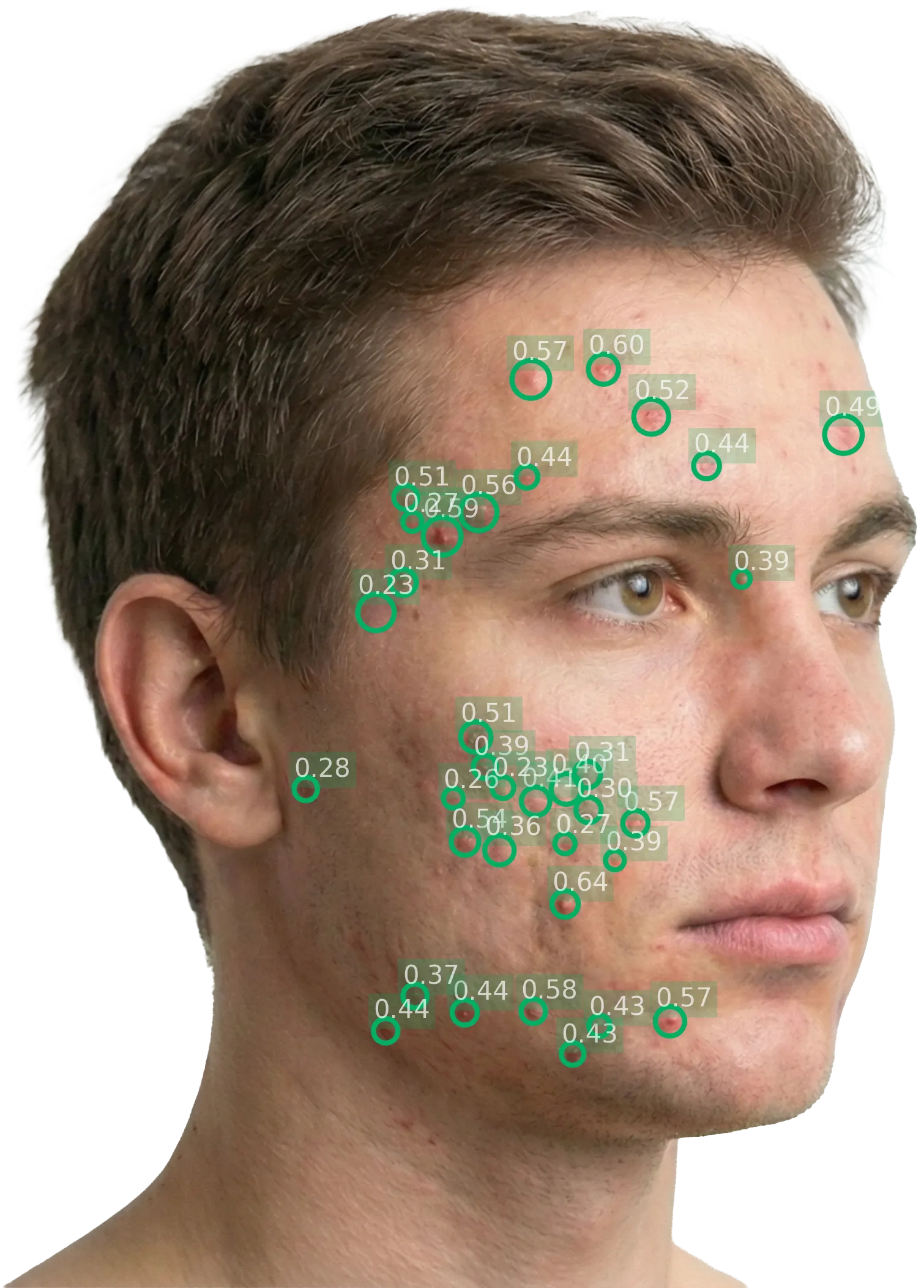
Body site
Left diagonal
Image quality
92%
Lesion count
36
Density
0.55
Local score
3.42
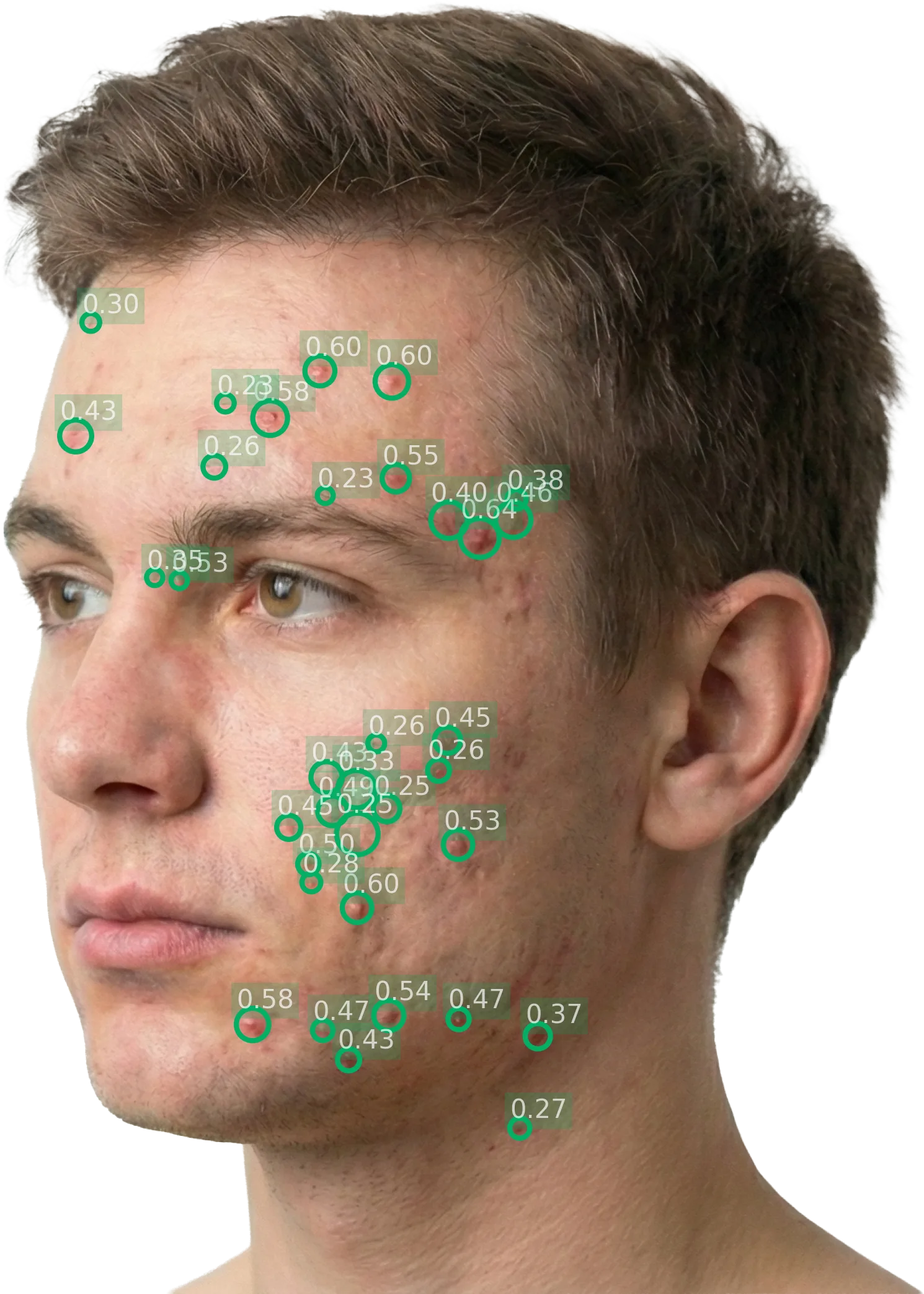
Body site
Right diagonal
Image quality
88%
Lesion count
35
Density
0.6
Local score
3.49
The report is immediately available for the investigator to review.
6. Report review
The investigator reviews the severity report directly in the platform. The report includes:
- Global scores: IGA (0–4) and ALADIN (0–10), with severity classification
- Per-perspective breakdown: Lesion count, density, and local scores for each perspective, with annotated images showing bounding boxes around detected lesions
- Image quality: DIQA score for each captured image
The investigator can verify that the AI's detections align with their clinical observation. If the images are inadequate, the investigator can recapture and resubmit; only the latest submission for each visit is retained.
7. Severity tracking
For follow-up visits, the platform tracks severity evolution across all assessments for the patient:
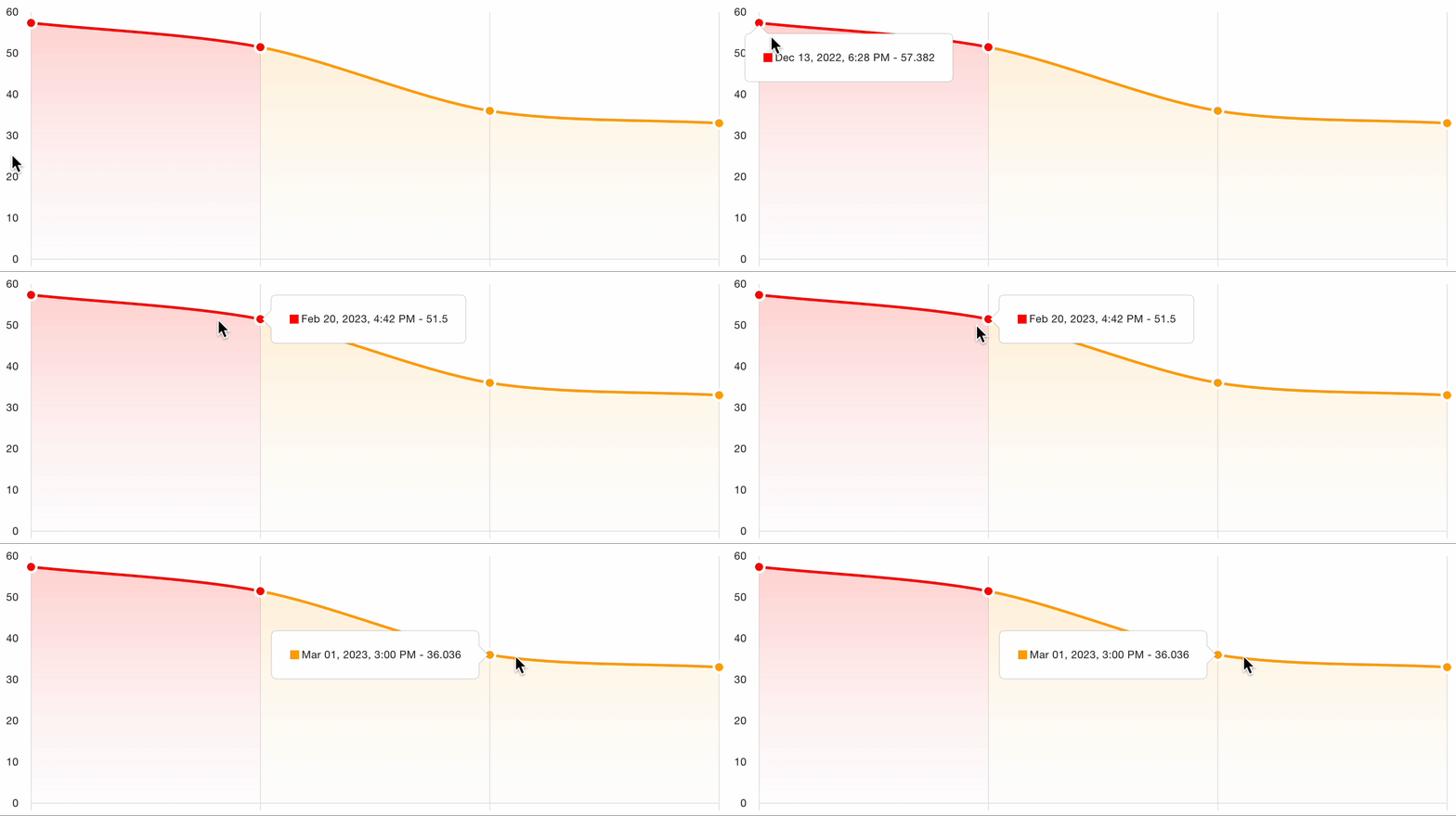
This longitudinal view enables:
- Visual comparison of scores over time
- Treatment response identification: clear trends in score improvement or worsening
- Protocol adherence monitoring: verify that assessments are captured at the correct visit intervals
- Automated charting of the severity trajectory for clinical review
8. Data export and EDC integration
Assessment results are structured for integration with the sponsor's EDC (Electronic Data Capture) system.
Exported data fields
| Field | Description | Format |
|---|---|---|
| Patient identifier | Study-specific pseudonymised ID | String |
| Visit date | Date and timestamp of the assessment | ISO 8601 |
| Global IGA score | IGA severity (0–4) | Integer |
| Global ALADIN score | Composite severity (0–10) | Float |
| Global lesion count | Total inflammatory lesions (deduplicated across perspectives) | Integer |
| Per-perspective IGA | Local IGA score for each perspective | Integer |
| Per-perspective lesion count | Lesions detected per perspective | Integer |
| Per-perspective density | Spatial density per perspective | Float (0–1) |
| DIQA scores | Image quality score per perspective | Float |
| Severity classification | Clear / Almost clear / Mild / Moderate / Severe | String |
Integration methods
- API-based: Automated data flow from the Legit.Health platform to the sponsor’s EDC system via RESTful API
- CSV export: Structured CSV files for manual import into EDC systems
- CRF field mapping: Data fields pre-mapped to the sponsor’s Case Report Form structure, configured during protocol design
- QuantifiCare platform integration: For studies using the combined QuantifiCare + Legit.Health solution, scoring data flows through QuantifiCare’s platform to the sponsor’s data management system
All exported data is structured for direct mapping to CRF fields in standard EDC systems (Medidata Rave, Veeva Vault CDMS, Oracle InForm, etc.).
The integration is API-based and system-agnostic; it works with any EDC system (Medidata Rave, Oracle InForm, Veeva Vault EDC, and others). Export formats include RESTful API, CSV/Excel, and structured JSON. Legit.Health provides IQ/OQ validation documentation and data mapping specifications to support the sponsor's integration validation activities.
Decentralised and hybrid trial support
Hybrid designs
Some study designs combine investigator-captured and patient-captured images:
- Investigator timepoints: Primary visits (e.g., baseline, month 3, month 6, month 12) where images are captured by trained site personnel at the clinic
- Patient timepoints: Intermediate visits (e.g., monthly check-ins) where the patient captures images at home using the mobile application
The same AI scoring pipeline processes both types of images. DIQA quality control is applied identically, ensuring that patient-captured images meet the same quality standards as investigator-captured images.
Remote patient capture
For fully decentralised protocols:
- Patients download the Legit.Health mobile application
- The app guides them through the capture process with the same perspective silhouettes and DIQA quality checks used at investigator sites
- Captured images are transmitted securely to the platform for AI scoring
- The investigator can review scores remotely
Benefits for sponsors
- Reduced site burden: Fewer in-clinic visits needed for severity assessment
- Increased data frequency: More timepoints without increasing site workload
- Patient convenience: Assessments from home reduce travel burden
- Continuous monitoring: More frequent assessments enable finer-grained treatment response detection