Dermatological AI embedded into your own system
Legit.Health is implemented as an app you embed where your users already work, configured from the URL, with an API that hands every report to your systems. Your clinicians or patients take the photograph with guidance, the report appears on screen with the ranked differential, the indexes and the severity score, and your record receives the same report as JSON, FHIR or PDF. It is live within a week.





The screens illustrate example cases and the reports used by the clinical team.
Illustrative, not the interface itself. Severity is also scored automatically.
What it is
Inside your system, with nothing to install.
It is an interface that lives inside the product your users already have open, which removes the three things that most often stop people from using a separate tool.
- No context switch. It opens where the clinician is already working, in the middle of the consultation, rather than in another tab that has to be found and signed into first.
- No second login. Your users are already authenticated by your system, and the app is authorised for your organisation with a key that is removed from the visible address, so it asks your users for no credentials, keeps no accounts and needs no patient names or email addresses to do its work.
- Nothing to install. An iframe is an ordinary HTML element. There is no package to deploy, no app store review to wait for and no fleet of devices to update when we ship an improvement.
Effort
Live within a week.
Because the interface is a URL in an iframe, the work on your side is wiring rather than building, and our integration team stays with you from picking the parameters to wiring up the backend call, so nobody has to work it out alone.
- Configure and embed, in about 15 minutes: Choose your parameters, drop the iframe into your product and watch it come up in your own colours.
- Store the result, in under a day: Save or forward the report to your record system, using either the callback we push or our endpoint your backend pulls from.
- Build the clinical workflow, in under a week: Turn the report into referrals, alerts and follow-up rules that suit how your service actually runs.
Branding and configuration
Your colours, your typeface, your workflow. All in the URL.
Appearance and behaviour are query parameters rather than a development project. Change a value and the interface changes with it, which is exactly what the console at the top of this page is doing.
https://iframe.legit.health/?embeddedKey=•••&primary=04af65&secondary=8671ff&fontFamily=Roboto&locale=en&isForPatient=0&enableResult=1&showQuestionnairesHeader=1&enableDiagnosisSupport=1&forcedScoringSystems=apasiLocal&enableAnamnesis=0¯oscopicMedia=optional&enableExtendedInstructions=0&enableAlternativeCameraModule=0&companyCallbackUrl=https://…&extraData=eyJ…&enableExtraDataInPdf=0- Personalise the interface with your own colour and typeface, in a light or dark theme, so it reads as part of your product rather than as somebody else's tool bolted on. It is built for screen readers, keyboard use and reduced motion.
- Decide which steps a user sees. Diagnosis support, a short clinical questionnaire (anamnesis) and a wider photograph of the surrounding skin are each switched on or off independently. The capture guidance and the quality check always run, because the instructions for use rely on both.
- Set the language: the app is multilingual, and further languages can be added on request.
- Run one configuration for clinicians and another for patients from the same integration, with the questionnaire wording adapting to whoever is answering. For patients, the result can be hidden, so they see only that their photographs were sent and the report goes to the healthcare professional.
- Attach your own identifiers to a report and route the result to a different endpoint per environment, by parameter.
Every parameter, with its default and its allowed values, is in the integration guide. Read the customisation reference
Image capture
Guided photographs, checked before analysis.
The app guides users through taking a photograph, checks its quality and explains how to retake it when needed. These steps are included in the app, ready to use within your service.
How it works
- The user says whether the problem is a single lesion, such as a mole, or a wider area, such as a rash, and the instructions change to match: minimal, or the full set of photography best practices.
- Each photograph can be cropped, and the body site is marked on a figure of the body.
- Every uploaded image is scored for visual quality. Below the threshold the user is asked to correct the problem and take it again, before anything reaches the clinician.
- Ask for a wider context photograph alongside the close-up where the surrounding skin matters, either as an option or as a requirement.
- Take the photographs by uploading them, with the camera inside the app, or with a phone: a QR code on the desktop opens the capture on the phone, and the photographs arrive back in the same session.
- Several photographs of the same lesion produce one report.
One workflow
Diagnosis and severity, in one flow.
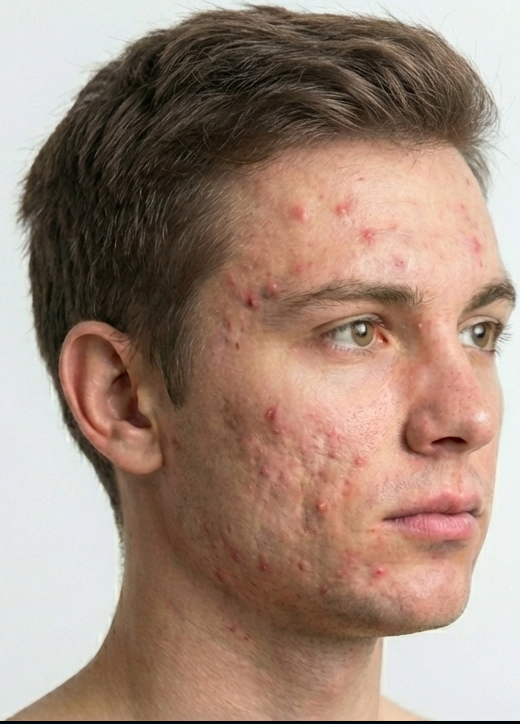
Most tools answer one question. Identifying the condition and measuring how bad it is are treated as separate products, which in practice means a second upload, a second screen and a calculation somebody does by hand. Here one photograph produces both, and when the condition detected has a validated severity score attached, the app delivers the finished score without anyone asking for it.
 MeasuredPhotograph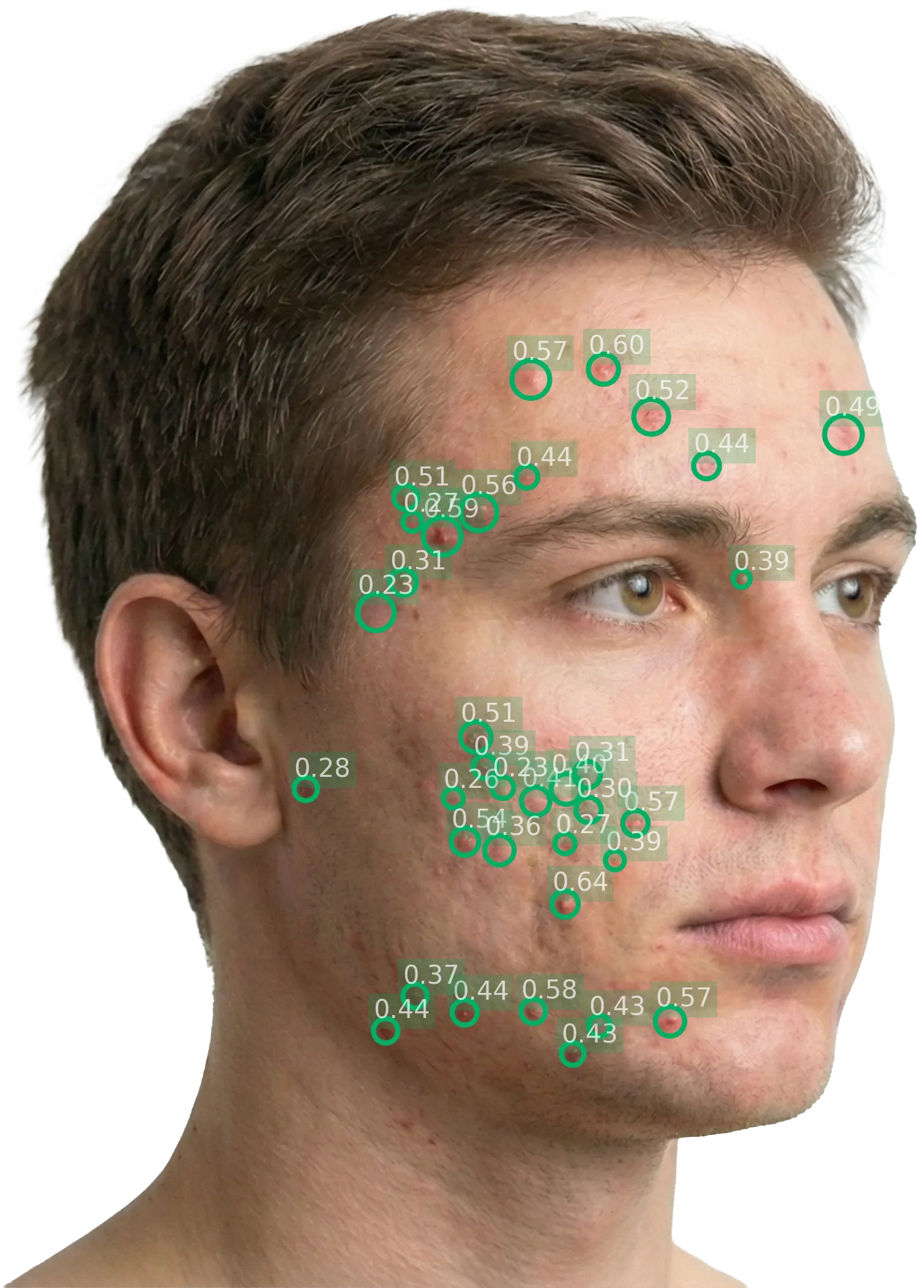
How it works
- Validated scoring systems across psoriasis, atopic dermatitis, urticaria, hidradenitis suppurativa, acne, alopecia, pressure ulcers and pigmented lesions.
- When a score needs answers only the patient can give, such as how itchy the skin is, the app asks them in the same flow.
- Pin a specific set of scores so they are always calculated, which is what a monitoring workflow for a known condition needs.
- Or switch the diagnostic step off entirely and measure severity alone, for a patient whose diagnosis is already confirmed and who is being followed over time.
- However many photographs and scores it takes, it is one report, and usage is counted per report.
Illustrative. Legit.Health returns a ranked differential with a confidence level for each condition, and calculates the associated validated severity score when one applies.
The report
The report the instructions for use describe, already built.
The instructions for use set what an interface showing Legit.Health's results must contain, each element to control a clinical risk. The app's report is our own implementation of that interface, so you do not design it, validate it or keep it up to date.
What it shows
- The ranked differential, with a bar for each condition on the same scale.
- The malignancy and referral indexes, each with its low, moderate or high band.
- How certain the result is, in words, from the entropy.
- The quality of each photograph, and the photographs themselves with Legit.Health's annotations.
- The severity scores, each with its details.
- The regulatory label: the product's name, its version, its UDI and a link to the instructions for use.
- A PDF of the report, for the record or for referral.
AI assistant
An assistant beside the report, not in place of it.
The app includes an AI assistant, separate from the medical device, for the two moments where people most often need help: taking a photograph that can be assessed, and understanding the report. It never diagnoses, never recommends a treatment and never changes the medical result.
How it works
- Photograph pre-check: before the photographs are sent, it checks that the skin is visible, centred, in focus, well lit, taken at a sensible distance and consistent with the body site chosen, and offers a retake when one is poor.
- Crop suggestion: it finds the affected skin and suggests a crop when the lesion is off-centre or small in the frame.
- Why a photograph was refused: when the quality check refuses a photograph, it says in plain words what to change.
- Consistency check: it looks at the photographs alongside the device's result and asks for a retake only when a fixable capture problem, such as blur, glare or a lesion cut off or missing from the photograph, prevents a usable assessment.
- Dermoscopy check: it flags a photograph analysed as a dermoscopic image that shows neither a pigmented lesion nor a skin tumour.
- The report in plain language: for clinicians, a short explanation of the indexes, the differential and the severity score inside each section of the report. It is never shown when a patient is using the app.
- Questions about the report: clinicians can ask, for example, what the top result means or how the score was calculated. Answers stay within the report and skin health, and point to urgent care if the clinician describes emergency symptoms. Patients do not see the chat.
- Under your control: each step is switched on or off from the URL, like the rest of the app, and if the assistant is unavailable the report is shown as usual.
The API, included
When you embed the app, you also get the API.
An assessment that ends on a screen has to be typed up by somebody. This one does not: the app comes with an API, so the finished report is structured data that goes into the patient's record as part of the same encounter. You choose the shape it arrives in with a single query parameter.
{
  "pathology": {
    "name": "Plaque psoriasis",
    "icd11": "EA90.0"
  },
  "bodySite": { "code": "armLeft" },
  "result": {
    "conclusions": [ … ],
    "scoringSystems": [ … ]
  },
  "extraData": { "encounterId": "ABC-123" },
  "pdf": "https://…"
}
The default. A flat shape meant to be read straight into your own tables, with no FHIR tooling needed.
Abbreviated. The full schema of each format is published in the integration guide.
How it works
- The app tells the page or the app around it the moment a report is ready, or a photograph was refused, on the web, iOS and Android.
- Your backend fetches the finished report from our endpoint with the identifier the app's event carries, or we push it to a callback URL you configure. Both models can run at once, and a report can be reopened from its link.
- Take it as HL7 FHIR resources and a FHIR-native record files it directly, with conditions and body sites carrying ICD-11 codes alongside our own. Take the flat JSON instead and you need no FHIR tooling at all.
- Your own identifiers travel with the report, so it arrives already keyed to the encounter it belongs to rather than needing to be matched up afterwards.
- Because the values are numbers, including the referral and malignancy indexes, you can drive triage and referral rules from the record itself.
Device API
Direct API integration with your own interface.
The device API lets you build Legit.Health into your own clinical interface. Your team implements and maintains the capture flow and result display in accordance with the instructions for use. The app provides these elements ready to embed.
What the instructions for use make mandatory
Any interface that captures photographs for Legit.Health or shows its results must include these, each one to control a clinical risk. An interface without them operates Legit.Health outside its intended use.
- The top five: the five most likely conditions in descending order of probability, as one block, each labelled with its ICD-11 code.
- The referral recommendation, beside the top five and never behind a click, a tab or a separate screen.
- The malignancy gauge, immediately visible as a gauge rather than plain text, whatever condition ranks first.
- Image quality, shown to the person who takes the photographs before they are sent, and on the report the healthcare professional receives.
- Entropy, on the report, so that an uncertain result is not read as a certain one.
- Severity, on the report, wherever your integration requests the severity assessment.
- Capture instructions and a cropper: the person taking the photograph chooses the type of problem and sees the steps for that type, then crops each image to the lesion or the affected skin before it is sent.
- The regulatory label and access to the electronic instructions for use.
What you have to run yourself
The instructions for use also recommend some elements and leave others to your organisation. Each one is work your team takes on.
- The six safety indicators: malignant, pre-malignant, associated with malignancy, pigmented lesion, urgent referral and high-priority referral. Showing them is recommended, preferably as always-visible states. For referral, you show the referral recommendation, which supersedes the urgent and high-priority indicators.
- Thresholds: the bands for image quality, entropy and referral are suggested ranges. Your organisation sets the ones that suit its population and its clinical protocol, including the image quality threshold below which a photograph is retaken.
- Severity calculation: where you request severity assessment, call it once for each photograph, with the signs to measure, and calculate the score from the findings.
Additional features included in the app
The app also includes an AI assistant, PDF reports, patient mode, questionnaires for severity scores, phone capture through a QR code and a multilingual interface. With direct API integration, your team chooses and builds the supporting features your service needs.
What it costs
The app's usage is counted per report, however many photographs and scores that report carries. Called directly, every call to the device API counts on its own: diagnosis and severity are separate calls, and severity assessment takes one photograph per call, so one assessment becomes several calls.
Behind every report, the app makes these calls to the device API for you: diagnosis support with the photographs of the lesion, and severity assessment with one photograph and the signs to measure. Your users see one report, and it counts as one.
{
  "images": [ {
    "data": "<base64 JPEG>",
    "colorModel": "rgb",
    "fileFormat": "jpeg"
  }, … ]
}
{
  "image": {
    "data": "<base64 JPEG>",
    "colorModel": "rgb",
    "fileFormat": "jpeg"
  },
  "experts": [
    "erythema_classifier",
    "desquamation_classifier",
    "induration_classifier",
    "erythema_segmenter"
  ]
}
When it makes sense
Direct API integration suits organisations with an existing clinical imaging interface and a team to maintain the required capture and reporting features. The app offers a ready-built alternative. The technical reference for the device API is in the installation manual.
Planifions unedémonstration en direct
Legit.Health est la solution d'intelligence artificielle tout-en-un avec des performances ultra élevées, des fonctionnalités exclusives et un soutien clinique.